



Authentic Shadows for Minecraft 1.17
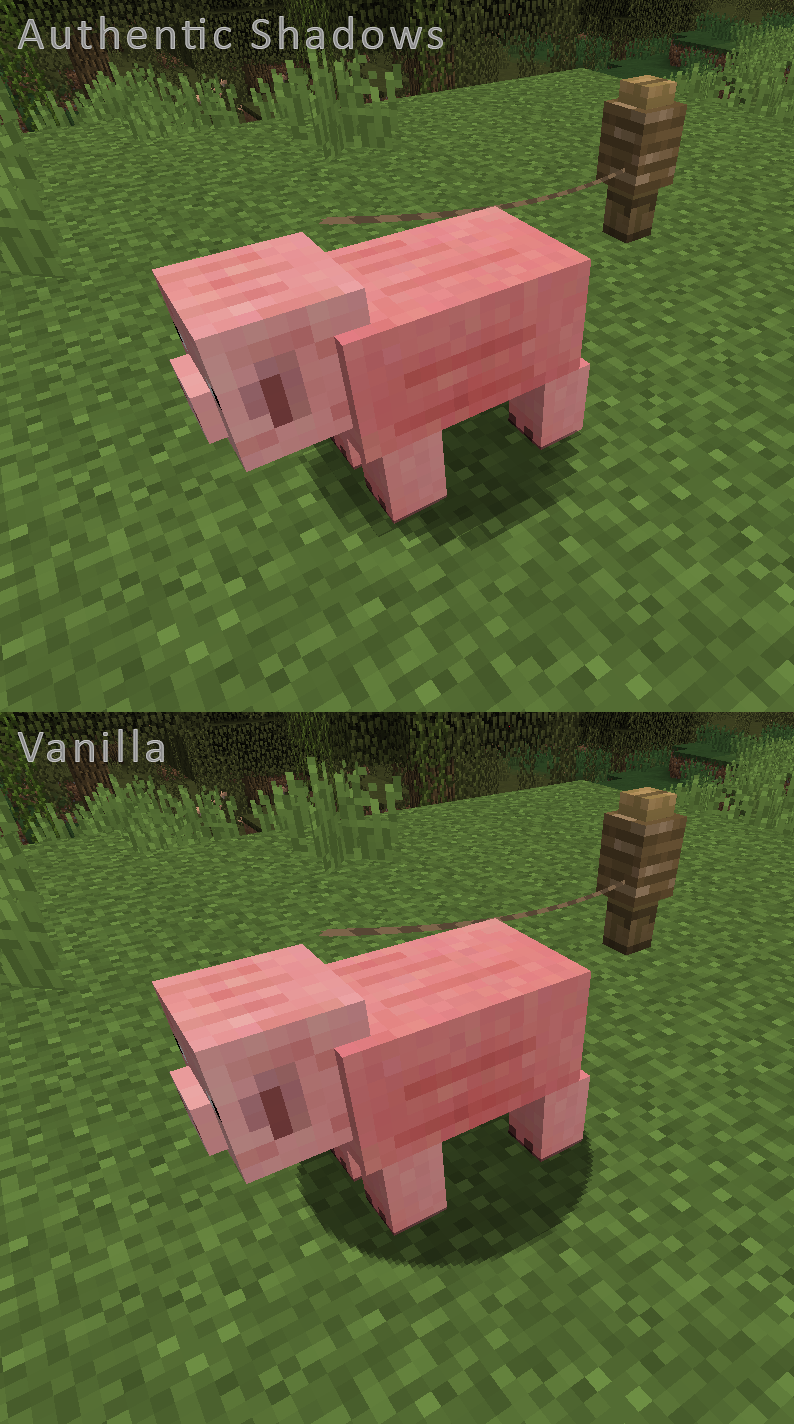
 Authentic Shadows for Minecraft is a great way to refresh the game’s environment and make it far better than it was before you installed the add-on. This time, you’re sure to enjoy the game to the fullest and admire new shadows that you’re bound to love and that will form the basis for a new adventure.
The author has made just one adjustment to the shadows, and it has significantly transformed the game. This is quite enough to set off once again to explore the familiar and much-loved interactive world. A host of new features, a pleasing combination of elements, and much more await you. The main thing is not to rush through your adventure and to enjoy every minute of it.
How to install the texture pack:
Step 1: Download the texture pack using the link below.
Step 2: Extract the downloaded archive and copy the Authentic Shadows folder to c:\Users\Пользователь\AppData\Roaming\.minecraft\resourcepacks\ (if this folder does not exist, create it yourself) (For Windows)
Step 3: In the game, go to Settings, then Resource Packs. In the list on the left, click the icon for the newly added texture pack.
Comments (0)