



Paper Cut-Out for Minecraft Pocket Edition 0.15
 If you’ve been missing the various updates to Minecraft, it’s time to treat you to a new way of enhancing the virtual world.
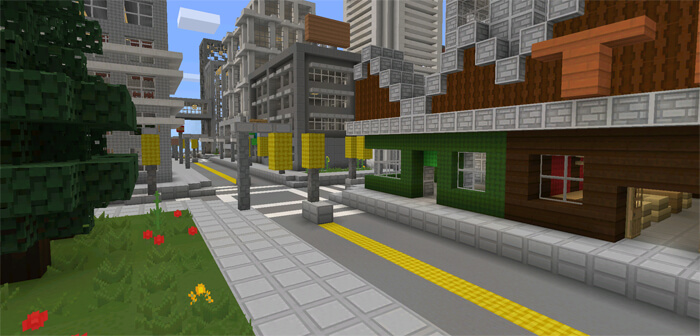
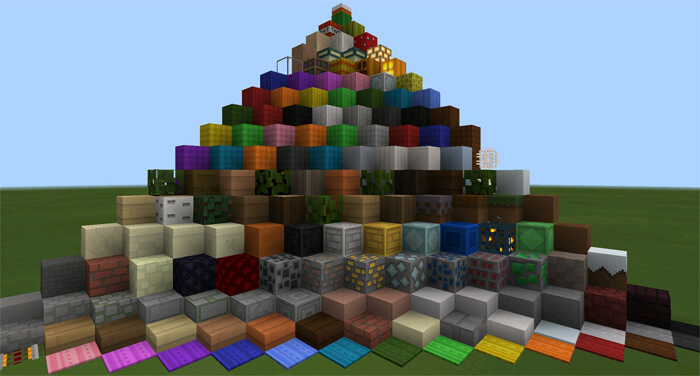
Today we’re bringing you a mod called Paper Cut-Out Texture Pack, which lets you completely transform the look of your adventure. In fact, this mod also slightly alters the appearance of the blocks themselves, making them as simple as possible while remaining visually pleasing. Simplicity and maximum detail have done their job and greatly enhanced the game’s visual appeal. All that remains is to wish you an enjoyable experience and happy gaming.
How to install the texture pack:
Step one: Download the texture pack using the link below.
Step two: Extract the downloaded archive and copy the Paper Cut-Out folder to games\com.mojang\resource_packs (if this folder does not exist, create it yourself)
Step three: In the game, go to Settings and click the ‘Manage’ button next to ‘Texture Packs’. The copied texture pack will appear in the list on the left; click on it so that it moves to the top of the list on the right.
Comments (0)